Post | 06 Mar 2026
Note (July 2026): This article was written when the site launched in March 2026. The private CV feature described below has since been removed — the public CV page now contains the full career history and detail.
An in depth look at this Portfolio Website
I decided after writing the initial post covering the tech stack that I'd write more about what exactly each bit of each notable file does as this was my key learning whilst putting together this site.
Introduction
To get a feel for this project, look at file package.json - this lists the frameworks, dependencies and the scripts used (such as build, start etc). It gives a quick summary of any given tech stack used. Since the site uses TypeScript, the next port of call is tsconfig.json, the config file for TS. Path aliases (e.g. @/components/) are defined here which majorly affects how it's configured within the rest of the project. With Next.js there is also a next.config.ts file, this shows any specific Next.js specific configurations - this is an empty shell on my site so far. Much the same with postcss.config.mjs which helps Tailwind (the CSS styling add on) work.
App Directory
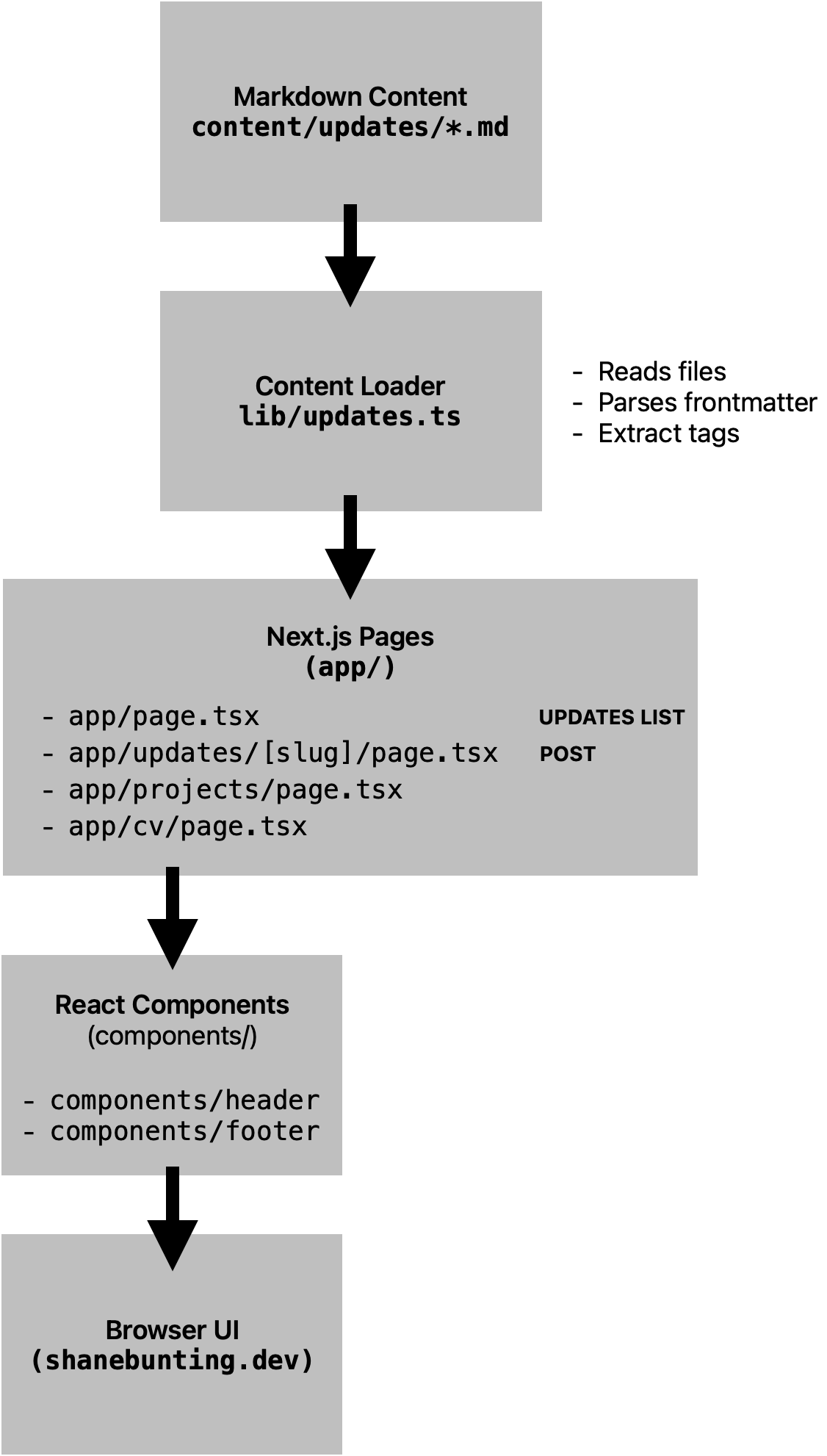
The heart of this website is found in the 'app' directory. This folder has a core file 'layout.tsx' - a global shell. It controls the content within 'app' including folders for pages of the site, content within, the sites icon, a sitemap and a critically important 'Middleware.ts' configuration file.
Digging into layout.tsx here and immediately CSS properties are defined, fonts are imported (by default, on this site, Geist, Geist Mono). I added metadata here early on - the usuals: site title, description - intended to make the site better indexed by Google and X. The site logo (favicon in old terms) and 'og-image' (which shows when you link it on something like iMessage) are defined here too. The default function 'RootLayout' here wraps every other page - so header, footer and all. It won't shock anybody, but this is how and why the likes of the font and navigation bits are consistent on every page, regardless of the state of the content of that page. This means once defined once, only the content needs to be passed in for each loaded page. This is reminiscent of the ASP.net website projects we worked on a year ago at college - hooked up remarkably similar though the syntax of this is a bit different.
Homepage
Next is the homepage itself, also within the app directory as 'page.tsx'. On this site, the main Updates page which lists every article I post - though some will be simple old' Twitter like short updates. I figured instead of posting these to LinkedIn or other platforms, they can simply all point back here. I can ramble on as much as I want and only those who are interested in following need click and stick with it - not invading the feeds of my professional network who didn't ask for it.
The homepage file gives away the server component structure of the site. It imports at the top akin to many programming class files. Functions are also defined like methods, usually returning something. Here it's defining the data format (used elsewhere for sorting articles), a function to update the page based on the tag clicked. I hope this will result in employers here to evaluate my experience or skills to be able to click and read project updates involving that technology - with links at the bottom to repos or projects themselves if published or usable first hand for them.
These are followed by the usual header, body, section and div etc that HTML is built with. There are brace tags which interrupt this to power links and call functions to define content like titles and of course, Tailwind CSS tags everywhere using a series of plain but clean definitions for spacing and styling. The Link feature is used where clickable links which vary by instance of object (per article) appear.
Article Pages
If each article appeared in full, images and all, sooner or later loading this site would become huge and unmanageable. So the homepage 'Updates' only renders a number of articles, and a little bit of them. Clicking the title will move into the full article page. This is made up of pages within a sub directory of app/updates/[slug]/page.tsx. This is how dynamic routing is handled. Static parameters are generated based off the title / filename of articles I write in markdown in another directory (Content). This file itself reads the file from the server, converts it into HTML that looks presentable using remark and renders it within a single content page. An article can be very long and rambly here! And digestable in reasonable chunks. A number of imports sit atop of this file: fs, path, gray-matter, remark, remark-html and next/navigation. These are used for functional purposes within the file - it reads an article markdown file, generates the 'slug' after the site URL by pulling out those parameters at the top (title, date etc.), calling on things like 'notFound' to gracefully handle very realistic scenarios where something is removed. It returns a fairly short post-parsed output of HTML - title, date, content.
Next is app/updates/page.tsx - simply a redirect only importing next/navigation and redirecting to '/' when the Updates link is clicked.
The core pages are within their own folders inside of 'app'. A page.tsx file inside projects, cv and cv-private. As this is written, Projects is still empty with an IOU line of text. It returns a custom function ProjectsPage which so far is nothing but basic HTML. On to the public CV page which is still barely developed, but more so than Projects. It has an according CvPage function which returns HTML content too, just more of it. CV Private so far exhibits the main pattern the other pages will soon - importing fs, path, gray-matter, remark and remark-html. This is how it imports the filepath of the content (stored in the Content directory), parses this markdown into HTML and returns its content. The return section defines styling and layout
Components
If all of the above could best be defined as page logic (how content is generated and found and returned) then the next folder, following on from app, is 'components'. In here are the site header and footer definitions, called above in the overally global 'layout' file. The header imports Link, and returns itself as a function. It has some Tailwind CSS styling applied and div / nav tags to define the nav bar options. The only interesting nuance here so far was the dropdown for public and private CV - the way the site worked was including the dropdown was causing the auth login dialog box to pop up with every single link click - this was fixed by finding a 'prefecth = false' property which stopped the automatic evaluation of the cv-private page making the site usable again. The footer file is much the same but with not much to write home about in current basic state.
Update Model
One of the most important files next is found at lib/updates.ts. This defines the structure of one of these article markdown files. This is what enables various site functions from libraries to perform actions on things like the date, title, tags and show them where asked for. We define a directory where content is to be stored. Define the 'getUpdates' function which looks for and breaks down the file titles, content and returns it in a way the site can handle attributes however I specify. The following function demonstrates this, it sorts by date putting newest update first as you see it on the Updates page. Another exists to getAllTags and getUpdateByTag. These extract and perform cleaning such as converting to lower case and then for filtering articles, comparing tags to a pool of all tags used, ensuring that any newly recognised tags are added. This file helps the site know what files exist and breaks each down so it can handle them - to reiterate since it's a really core aspect to this site.
Within the 'content' directory now are each .md markdown files. The sites lib/updates.ts defined that it looks here to find these. And what to look for within each file. I write each update and include certain details at the top title, date, tags etc. Tags, links and images are the main goal to convey on the site. This is the content, slipped into the sites layout and rendering logic defined above.
I chose a markdown-based content system rather than a database-backed CMS because it keeps the site simple, version controlled, and portable. Each article exists as a file within the repository, meaning the entire site — content and code — can be managed through Git. This also keeps the architecture lightweight while still enabling features such as tags, excerpts and image references.
Images and Referencing
This is primarily a static site but partially server rendered through Next.js when needed. Pages and content are generated or uploaded and displayed static to visiors. The public/images directory stores images, and this allows article files or other parts of the site to simply refer to them with a /.
Middleware.ts
Middleware.ts is a crucial file, in the root directory. This has security duties for the site to protect the cv-private page as I mentioned above, 'route protection'. This imports NextResponse and NextRequest to tap into powerful libraries. It defines the protected pages path upfront. An unauthorised function defines a 401 unauthorised error. Below is a middleware function that defines the username and password environment variables and the decoding / buffer phases of the text strings handled.