Post | 06 Apr 2026
Northwest Veterinary Management Information Project
This was the final project in Year 2 of my Software Development HLA at NWRC. It was co-developed with a classmate and colleague from Fujitsu. The task was to create a database-driven Windows Forms app for a fictional business of our choosing. The project involved producing the relevant planning documentation, diagrams and test plans in late 2024, then building the application in early 2025.
My personal contributions were in the UI design, branding and staff-management sections such as stock management, which were only accessible through the 'admin' user login.
Project Summary
The program is a Windows Forms app built in Visual Studio using the Microsoft .NET Framework and C#. It is connected to a locally run SQL database instance. This tech stack was mandated by the assignment brief. The main workflows the program supports are the day-to-day management of customers, pets, appointments and treatments by veterinary administration staff. In addition, it includes stock and inventory management, along with financial reporting for practice management. Most views allow users to add a new record or edit an existing one, with some records such as orders combining multiple database tables according to business logic and relational database rules.
Although it was a relatively simple project, it taught me early on the sheer amount of testing and planning that even a basic set of functions can require.
Our final result was fairly close to the planning stage. Looking at previous-year submissions, the assignment guidance and many online examples of similar Windows Forms apps made it easier to set a realistic goal in terms of what was possible with the stack, as well as what could be delivered tastefully within the constrained timescale of the module. We both received very high marks for this project and were asked to present it to colleagues at work, giving them a technical overview and demo.
Technology Stack
- C#
- Windows Forms
- .NET Framework 4.7.2
- SQL Server LocalDB
- ADO.NET
A 'DatabaseHelper' file was used to store the connection string, which differed between my setup and my partner's. I was working on the project in a Parallels VM on a Mac, which involved some ARM-related limitations and SQL workarounds, while she was using a native Windows PC. We commented out one of the two connection strings in favour of whichever version worked for us between pushes and pulls from GitHub.
Main Features
- Customer management
- Appointment booking and management
- Pet health records
- Stock and supplier management
- Invoicing and payments
- Reporting
- Search, filtering and sorting
- User roles and permissions (admin and staff)
These features were implemented in the final submission build. User roles were functional, although limited in that they used hard-coded values. If time had not been a concern, I would have implemented a more customizable and expandable user system, including a password reset facility. Reporting was handled with Crystal Reports, but it was not fully integrated into the system due to time constraints. That was acceptable for the assignment and was fairly typical across teams.
Screenshot Walkthrough
A few key interfaces of the project and commentary.
1. Login
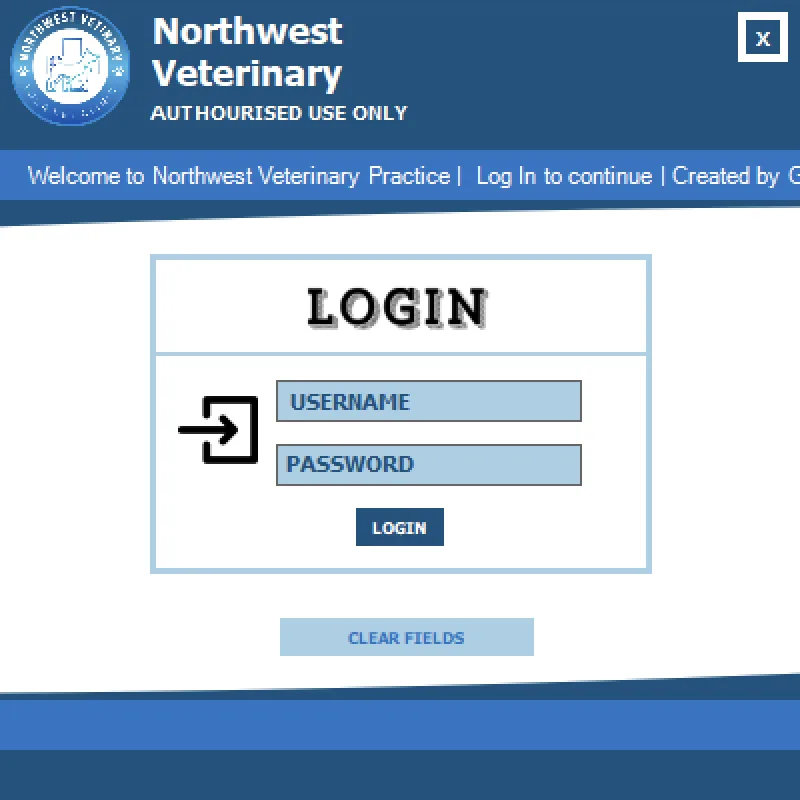
This screen supports logging in as either an admin or staff user and validates the password against a hard-coded environment variable. It also includes a scrolling line of text welcoming users and crediting us as the developers. The placeholder text in the input fields disappeared when clicked, and focus moved as users would expect. Tab order also moved cleanly to the password field. Failed attempts present a basic validation message.
2. Main Dashboard
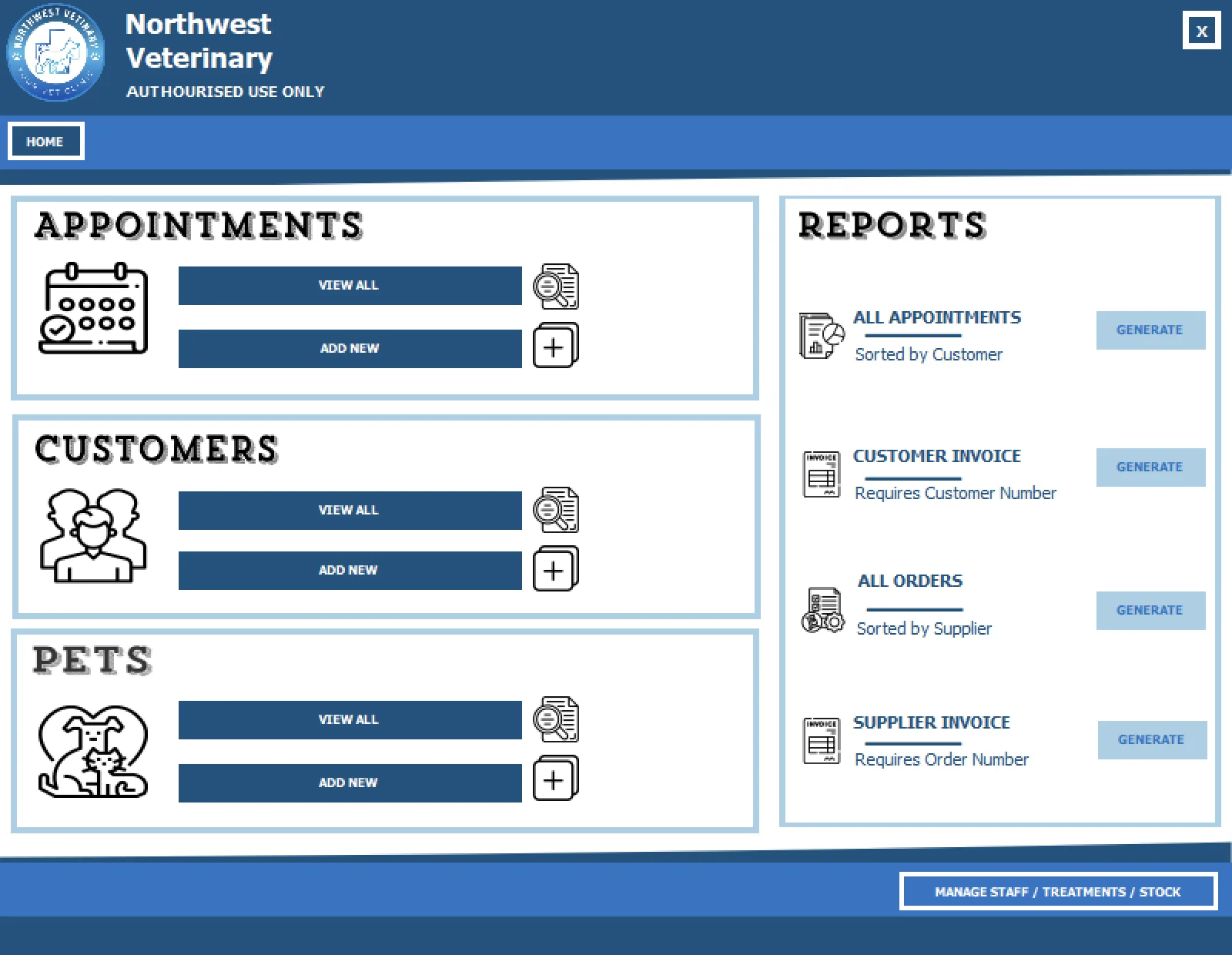
After logging in, this is the main view. The bottom-right button confirms that you are logged in as the admin user; the staff account does not show this option. This area contains my colleague's functions, including appointments, customers, pets and the top two reports. Clicking the staff option presents my sections of the software.
We had to work hard to keep the application visually consistent. To keep development fast and iterative, we would often each build our own version of something, then agree on the strongest variant and copy or adapt it across our sections. Button styling and font sizing were good examples of this. Working with Visual Studio and Windows Forms can be very fiddly. In particular, achieving that light blue outline required layering two panels, with a white one overlaid to give the illusion of a border, because we were encouraged not to bring in third-party libraries, especially for styling.
Programmatically closing one form before opening the next was also important to get right. Otherwise, leaving older views open, particularly list views, led to locking on database tables and caused issues in subsequent views and input operations. That was a lesson learned the hard way.
3. Main Screen / Appointment Overview
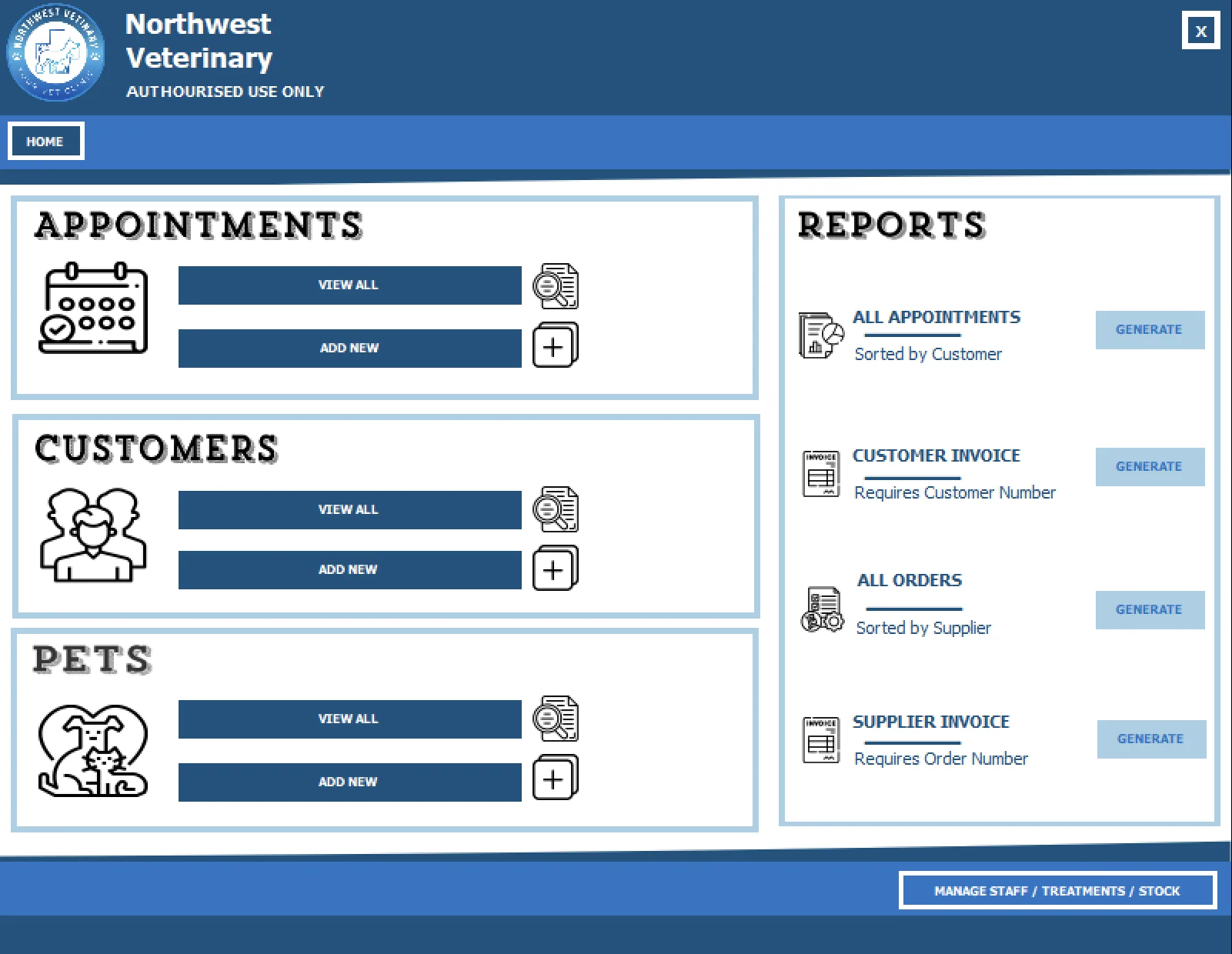
My colleague worked on this area and, for the most part, it mirrors the same sort of list/detail views seen in my sections below. This supported a staff member's daily workflow, including making appointments and adding customers and pets. A calendar view was added and was quite impressive. She even went as far as implementing a "Pet Club" system, generating membership numbers and handling a wide range of pet options to ensure the system felt realistic and flexible.
4. Management Area
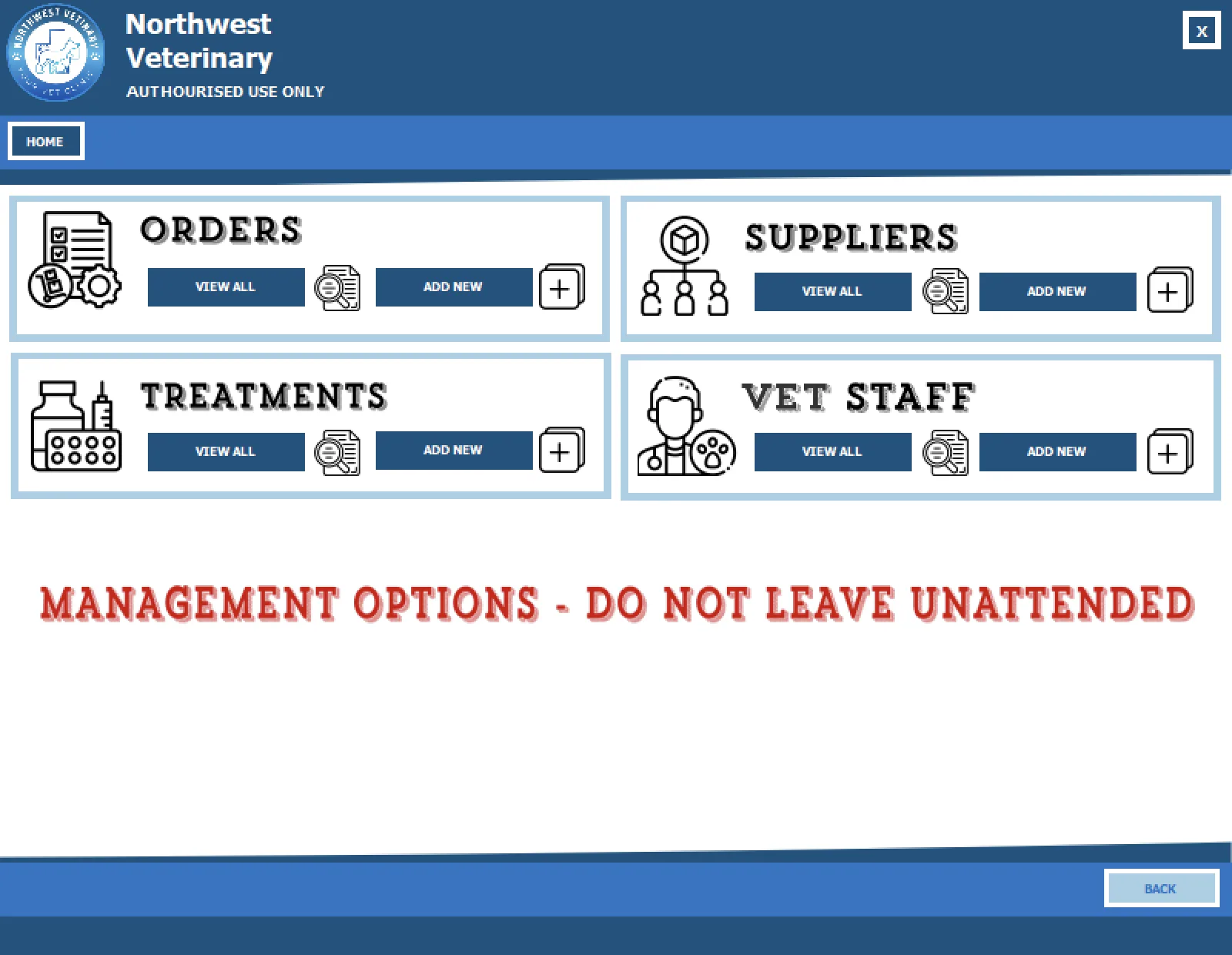 This was my sub-main menu, only accessible by admin users. It allowed access to managing stock orders, treatment inventory, supplier information and veterinary staff records. A warning reminds users not to leave this sensitive information view open. The View All path provides a list of all existing records, as well as easy access to add a new one.
5. Staff List
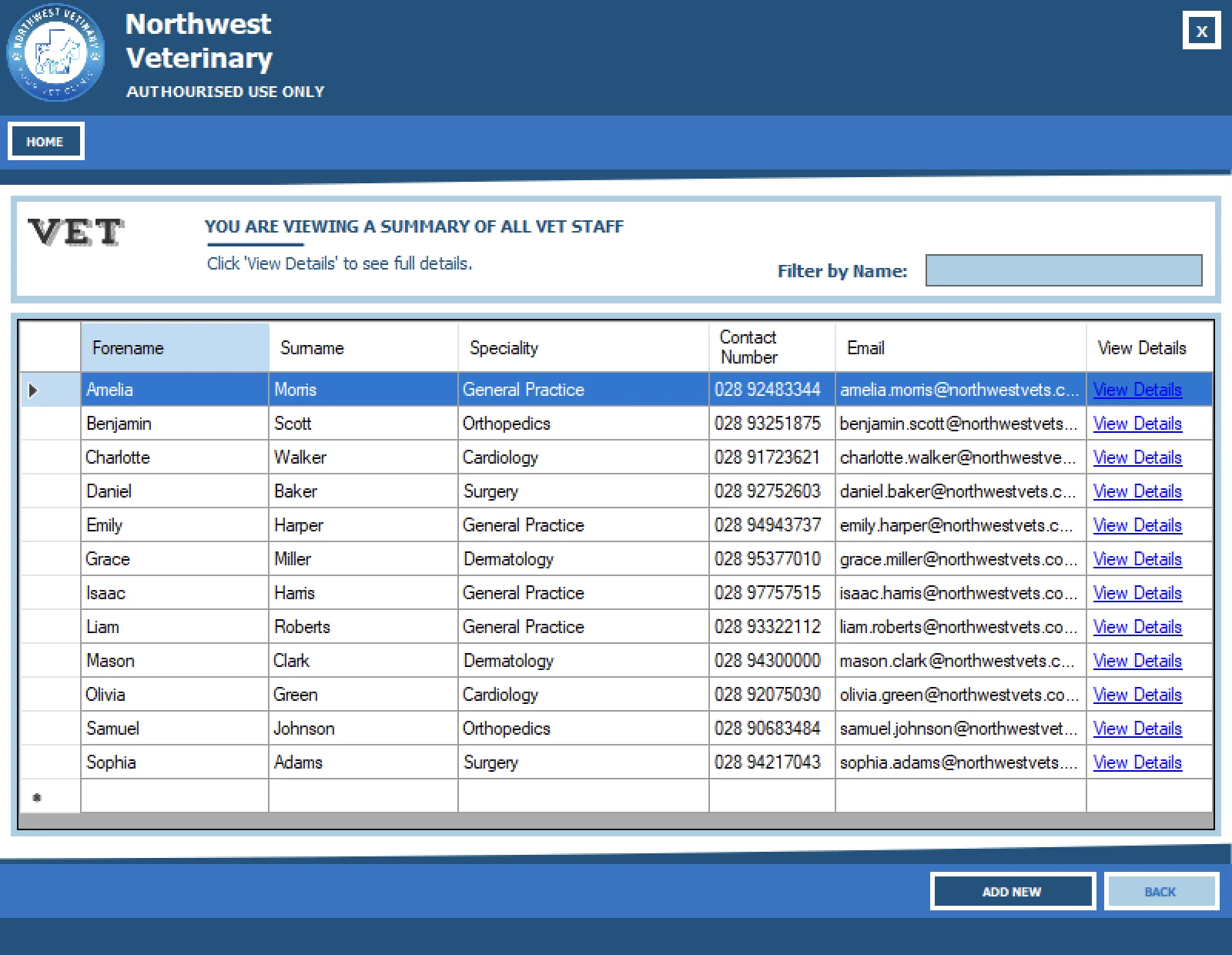
The staff (vet) list shows all employee records. This is used when booking appointments in other areas of the program. It presents key columns from the database table for quick reference, along with a search/filter feature that updates with each character entered. View Details launches the detail view, which became a pattern used in the later management screens too. This is the route to make changes or view non-key details for a staff member. Simple descriptive text, consistent titles and the agreed branding, including the logo on screen at all times, are all reflected here as they are across the wider system.
6. Treatment List
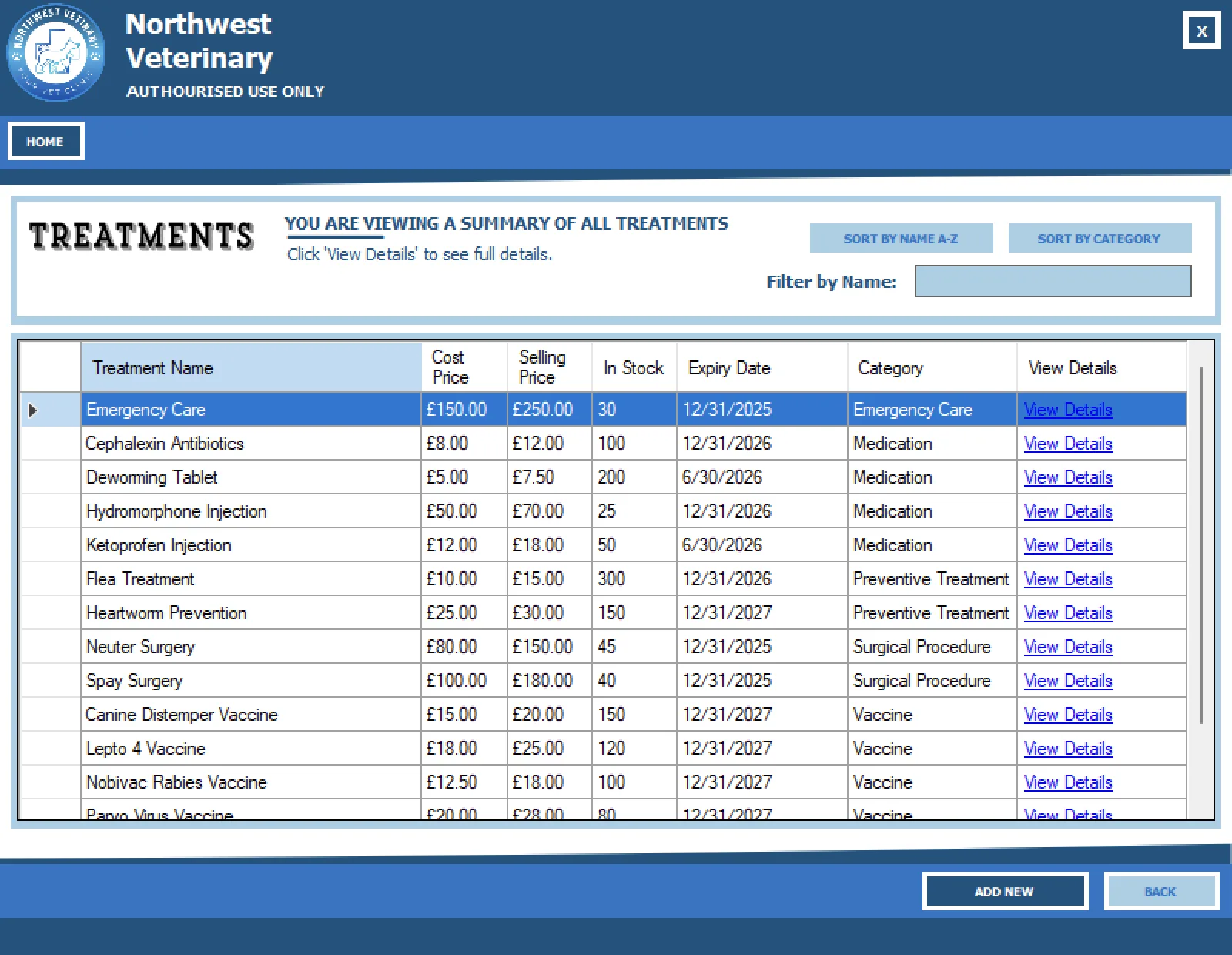
The treatment list view is broadly similar to the staff list, but with more contextually relevant sorting options such as A-Z or by category. The at-a-glance view shows key information about medical products in stock, including the latest price and quantity available. These records are used in reporting, invoicing, and appointments or prescriptions in other parts of the system. The ability to add a new product is also accessed here, which we agreed would be a commonly needed function in a real-world system.
7. Orders List
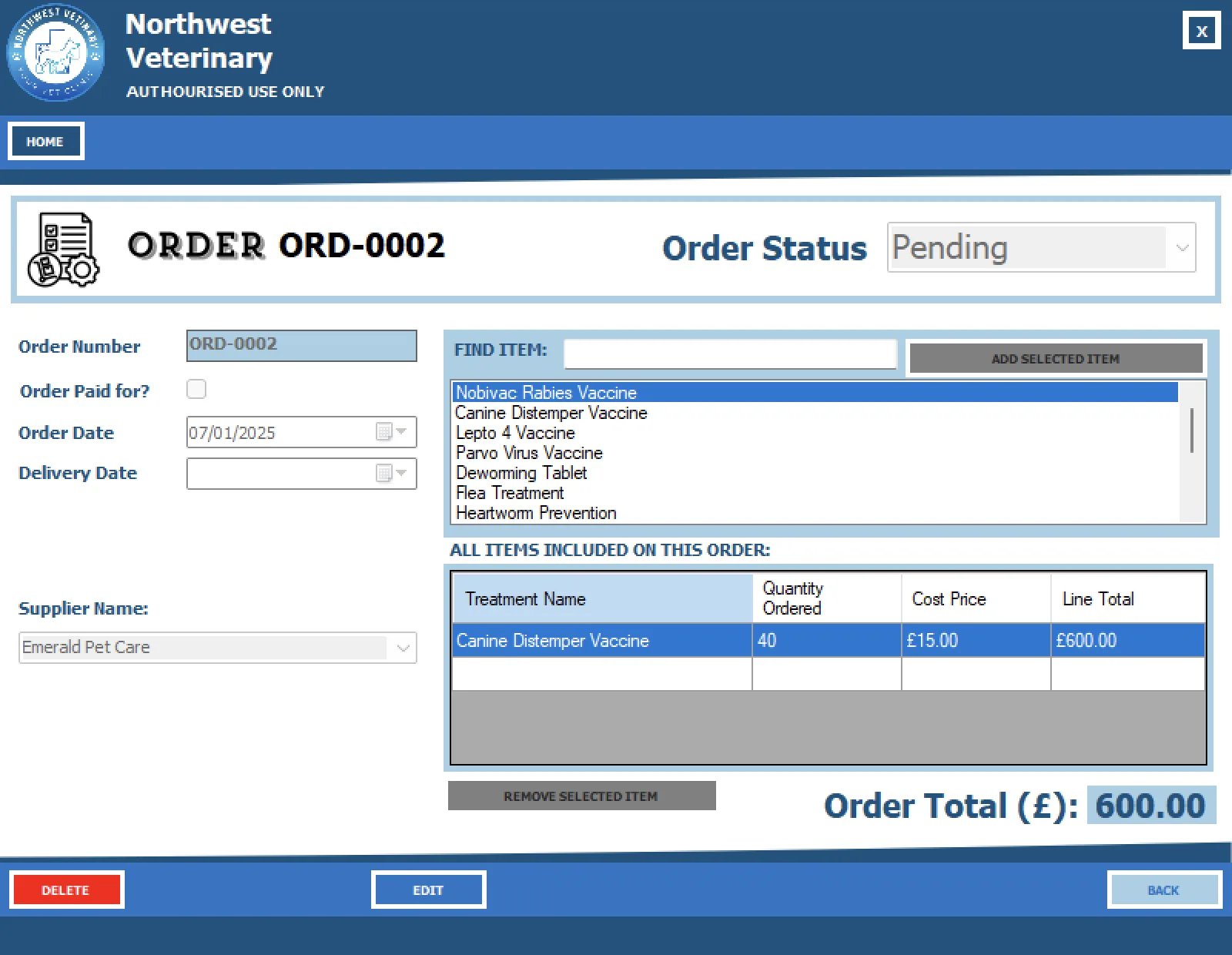
The stock-ordering facility was the most complex part of my contribution to the program. It generated a new order number in the database with a default logical order status and order date, defaulting to the current day, while leaving space to revisit the record later and add auditable information such as delivery date and paid status. It reads in the existing list of orderable products used by the practice and includes a sub-view that calculates line totals and the overall order total. An existing active supplier in the system also has to be assigned to each order. The edit view controls locking and editing of changes made to the order form data. Deleting presents a warning dialog for confirmation, and validation is applied throughout the required fields.
8. Add Order
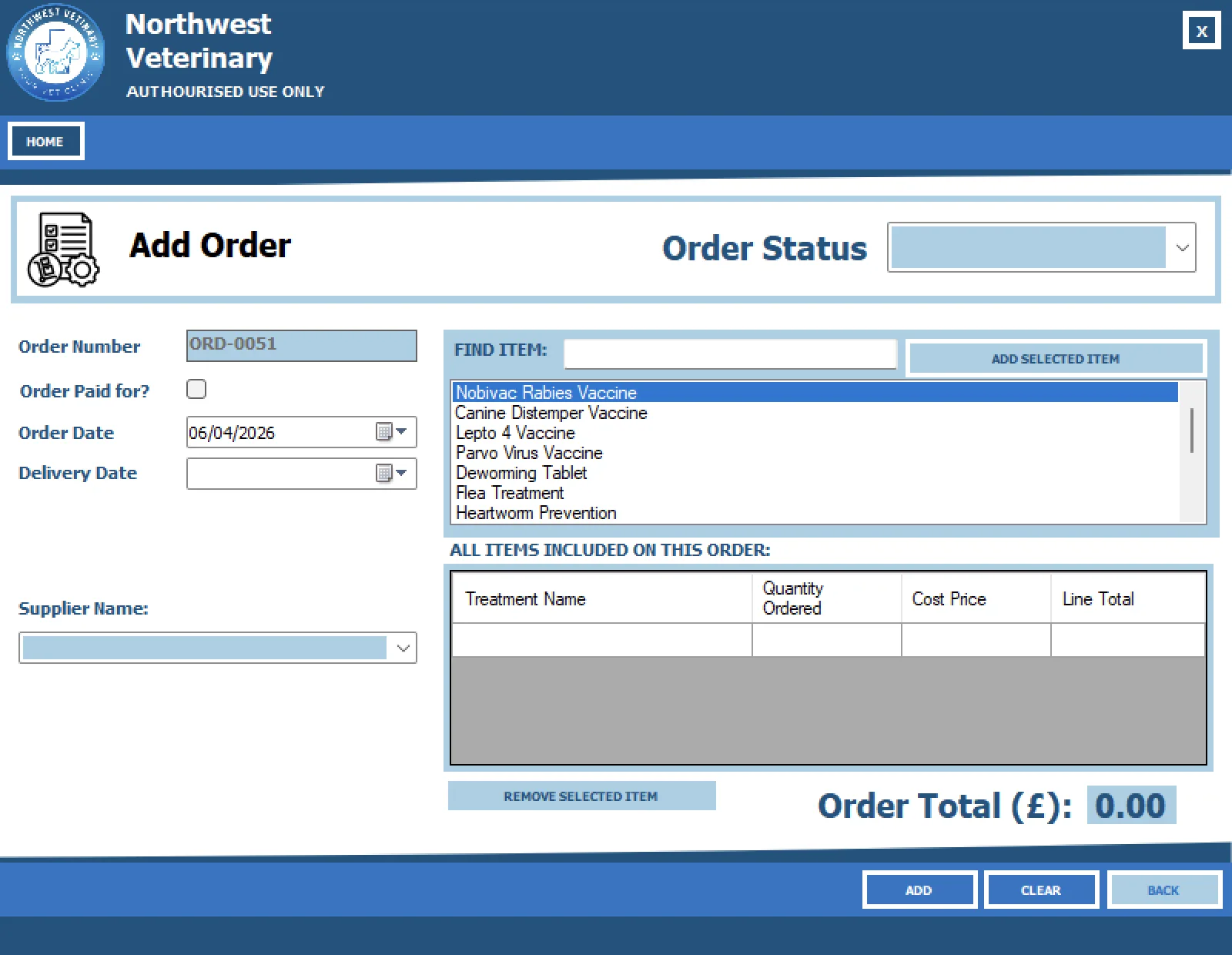
Here you can see how adding a new order handles a new order number and placed date. The order status must be assigned to Pending or another value from the list, depending on whether the order is newly placed or is being entered later for record-keeping purposes.
9. Supplier List
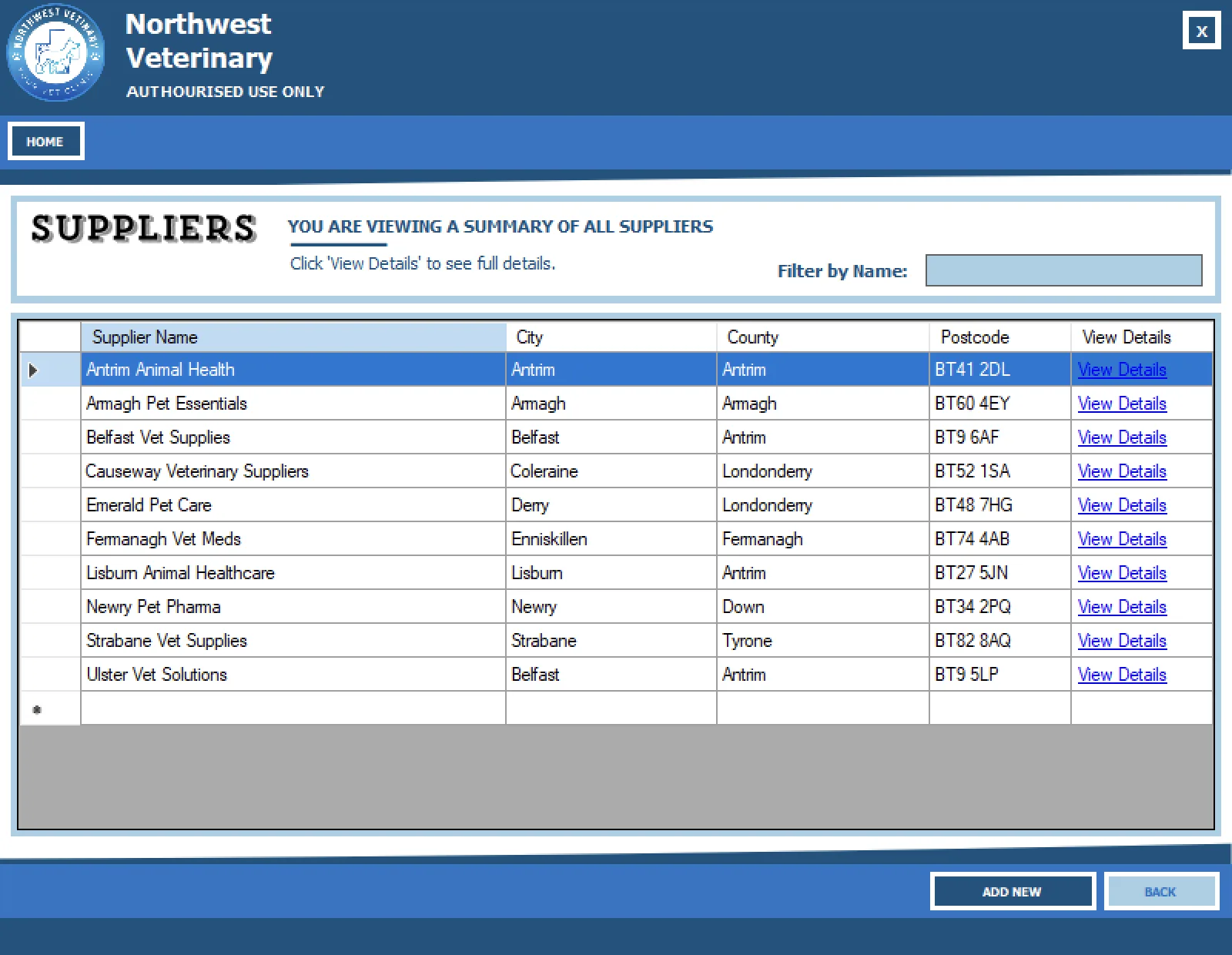
Suppliers follow a similar pattern, with a summary list view that can be drilled into further or searched when staff are looking for a specific supplier's details. This is also where new suppliers can be added when needed.
10. Order Summary / Invoice Style View
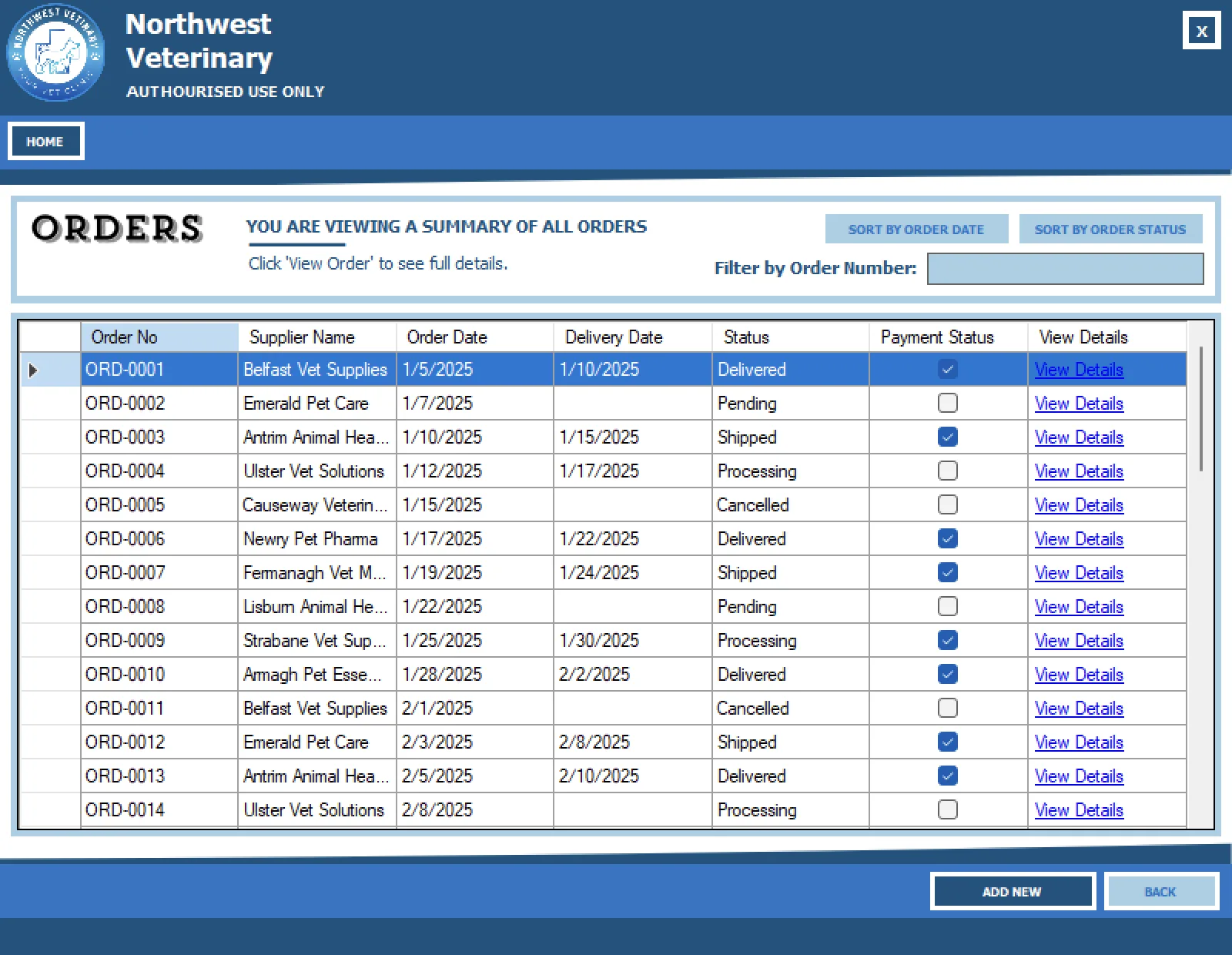
Order summaries are displayed here and can be viewed fully, as with the rest of the form views. Sorting by order date and status is the main contextual difference.
Database and Data Access
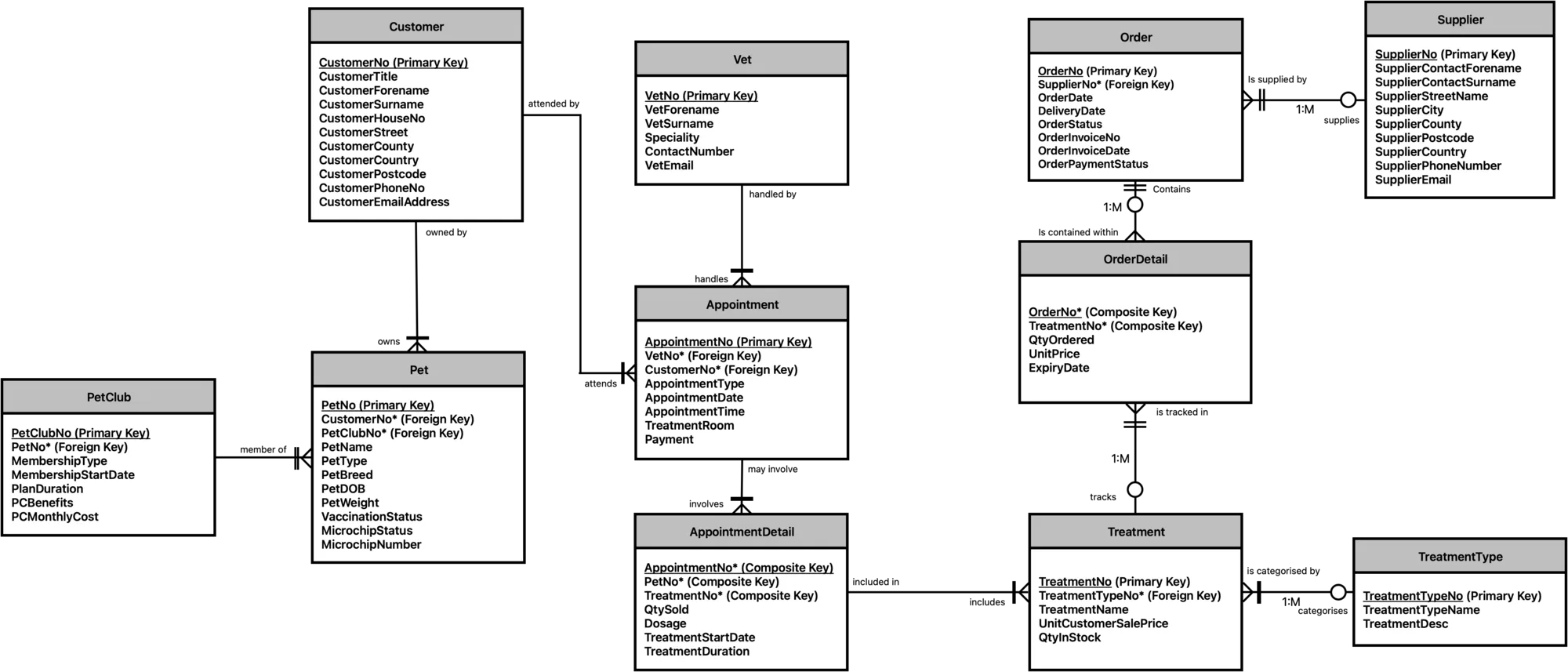
The back-end SQL database links together the various tables relating to each record type. The two sides of the program join on the 'Treatments' table, which forms a key part of both the staff-management side that I worked on and the customer and appointment side that my classmate developed.
UI and Windows Forms Structure
Windows Forms makes up the entirety of the user-facing interface of the project. Using the built-in click actions and event handlers, forms are closed and opened as new window instances. Helper methods to handle this were added where required. 'DataGridView' is the core of how database record information is presented, interacted with and persisted by the user. Simple methods also control the search, sort and filter actions. Form validation events were written once in a dedicated class and then called from various interface forms to return validation messages and apply logic.
Overall, this was quite logical. It was not until working on Mindful Check-In using Swift more recently that I came across more modern ways of handling interfaces based on state. There is not as much flexibility in Windows Forms without additional libraries. It is very turn-of-the-century Microsoft in style, with various Windows 7 and Windows 8-era touches on top. For desktop use and for simple apps it is fine, though I could not see it translating as well to other platforms in the way modern languages and frameworks now tend to. I would like to try more modern Microsoft, or otherwise Windows-focused, projects to see how things have evolved.
Challenges and Lessons Learned
This project taught me a tonne. Collaborating with another person on a complex set of assignment requirements pushed me to use GitHub properly and more effectively. Ensuring that our database schema was fit for purpose, and would support the system as we had planned it, was particularly challenging and, until solved, blocked further progress on the UI. It was also the first time I had to properly apply validation rules in an app that placed more real-world demand on them. Taking all of that into account, on top of learning how Windows Forms worked and dealing with the beast that is Visual Studio, made it a big challenge, but a very rewarding one to see come together.